In Part 1 of this series, we installed MLX and ran a local large language model (LLM) like Mistral 7B Instruct directly on macOS.
Now, let’s take it a step further and build a web-based chat interface using Streamlit — so you can interact with your local model just like ChatGPT, right from your browser.
Why Streamlit?
Streamlit is a powerful Python library for turning scripts into web apps — no JavaScript required.
It’s perfect for creating an intuitive and fast chat UI that connects to your MLX model.
You’ll be able to:
- Chat with your local LLM through a browser
- Stream model responses in real time
- (Optional) Add support for PDFs, image inputs, or parameter tuning later
Step 1: Install Streamlit and Dependencies
If you already have your MLX environment set up (from Part 1), make sure you’re inside your virtual environment:
cd ~/dev/mlx-ui
source .venv/bin/activate
Then install the necessary packages:
pip install streamlit mlx torch torchvision sentencepieceTo test your Streamlit installation:
streamlit helloThis will open a demo app at http://localhost:8501.
Once you see the sample dashboard, close it with Ctrl+C
Step 2: Create Your Streamlit App File
Inside your ~/dev/mlx-ui folder, create a new file named:
streamlit_app.pyOpen it in your favorite code editor and add the following code. Remember to add path to your local model in model_id.
Open your local MLX model stored in the hidden cache folder by navigating to it in Terminal. You need path to the config.json file which is in a subfolder within snapshots folder
open ~/.cache/huggingface/hub
import sys
import inspect
import streamlit as st
from mlx_lm import load, stream_generate

# ---------------------- Page & Sidebar --------------------

st.set_page_config(page_title="Local MLX Chat", layout="centered")

with st.sidebar:
    st.header("⚙️ Settings")
    model_repo = st.text_input(
        "Model (HF repo or local path)",
        value="/Users/amanyadav/.cache/huggingface/hub/models--mlx-community--Mistral-7B-Instruct-v0.3-4bit/snapshots/a4b8f870474b0eb527f466a03fbc187830d271f5",
        help="Any MLX-compatible HF repo or a local path to an MLX-converted model.",
    )
    temperature = st.slider("Temperature", 0.0, 1.5, 0.7, 0.05)
    max_tokens = st.slider("Max tokens", 64, 4096, 512, 32)
    top_p = st.slider("Top-p", 0.0, 1.0, 0.95, 0.01)
    system_prompt = st.text_area(
        "System prompt",
        value="You are a helpful, concise assistant.",
        height=100,
    )
    trust_remote = st.checkbox(
        "Trust remote tokenizer code (needed for some models, e.g., Qwen)",
        value=False,
    )

# ---------------------- Model Loading (cached) ----------------------
@st.cache_resource(show_spinner=True)
def load_model(repo: str, trust_remote_code: bool):
    tokenizer_cfg = {"trust_remote_code": bool(trust_remote_code)}
    model, tokenizer = load(repo, tokenizer_config=tokenizer_cfg)
    return model, tokenizer

with st.spinner("Loading model…"):
    model, tokenizer = load_model(model_repo, trust_remote)

# ---------------------- Chat State Helpers ----------------------
def ensure_history_initialized(current_system_prompt: str):
    """Create/refresh chat history and keep the latest system prompt as the first message."""
    if "messages" not in st.session_state:
        st.session_state.messages = [{"role": "system", "content": current_system_prompt}]
    # Always reflect the latest system prompt in the first message
    st.session_state.messages[0] = {"role": "system", "content": current_system_prompt}

ensure_history_initialized(system_prompt)

st.title("MLX Local Chat")

# Render prior messages (skip system message at index 0)
for msg in st.session_state.messages[1:]:
    with st.chat_message(msg["role"]):
        st.markdown(msg["content"])

# ---------------------- Compatibility Streaming Wrapper ----------------------
def _stream_generate_compat(model, tokenizer, prompt, max_tokens, temperature, top_p):
    """
    Calls mlx_lm.stream_generate with only the kwargs that your installed version supports.
    Handles: temperature/temp, max_tokens/max_new_tokens, optional top_p.
    """
    try:
        params = set(inspect.signature(stream_generate).parameters.keys())
    except Exception:
        params = set()

    kwargs = {}
    # token count kw
    if "max_tokens" in params:
        kwargs["max_tokens"] = max_tokens
    elif "max_new_tokens" in params:
        kwargs["max_new_tokens"] = max_tokens

    # temperature kw
    if "temperature" in params:
        kwargs["temperature"] = temperature
    elif "temp" in params:
        kwargs["temp"] = temperature

    # optional top_p
    if "top_p" in params:
        kwargs["top_p"] = top_p

    # sensible fallback if we couldn't inspect
    if not kwargs:
        kwargs = {"max_tokens": max_tokens, "temperature": temperature, "top_p": top_p}

    # stream
    yield from stream_generate(model, tokenizer, prompt, **kwargs)

def stream_reply(messages):
    # Use chat template if available; fall back to a simple formatted prompt
    try:
        prompt = tokenizer.apply_chat_template(messages, add_generation_prompt=True)
    except Exception:
        sys_msg = next((m["content"] for m in messages if m["role"] == "system"), "")
        convo = "\n".join(
            f"{m['role'].upper()}: {m['content']}" for m in messages if m["role"] != "system"
        )
        prompt = (f"System: {sys_msg}\n{convo}\nASSISTANT:" if sys_msg else f"{convo}\nASSISTANT:")

    for resp in _stream_generate_compat(
        model, tokenizer, prompt,
        max_tokens=max_tokens,
        temperature=temperature,
        top_p=top_p,
    ):
        # Newer mlx-lm yields objects with .text; some older versions yield plain strings
        chunk = getattr(resp, "text", None)
        yield chunk if chunk is not None else str(resp)

# ---------------------- UI Actions: Regenerate & Clear ----------------------
def do_assistant_turn():
    """Stream a reply and append it to chat history."""
    with st.chat_message("assistant"):
        full = st.write_stream(stream_reply(st.session_state.messages))
    st.session_state.messages.append({"role": "assistant", "content": full})

c1, c2 = st.columns(2)
with c1:
    regen_clicked = st.button("🔁 Regenerate response", use_container_width=True)
with c2:
    clear_clicked = st.button("🗑️ Clear chat", use_container_width=True)

# Clear chat: keep current system prompt
if clear_clicked:
    st.session_state.messages = [{"role": "system", "content": system_prompt}]
    st.rerun()

# Regenerate: remove last assistant reply (if present) and re-run
if regen_clicked:
    has_user = any(m["role"] == "user" for m in st.session_state.messages)
    if not has_user:
        st.warning("Nothing to regenerate yet — send a message first.")
    else:
        if st.session_state.messages[-1]["role"] == "assistant":
            st.session_state.messages.pop()
        do_assistant_turn()
        st.rerun()

# ---------------------- Chat Input ----------------------
user_input = st.chat_input("Ask me anything…")
if user_input:
    st.session_state.messages.append({"role": "user", "content": user_input})
    do_assistant_turn()
▶️ Step 3: Run the WebUI
In your terminal, make sure you’re still in the virtual environment and run:
streamlit run streamlit_app.pyYour browser should open automatically to:
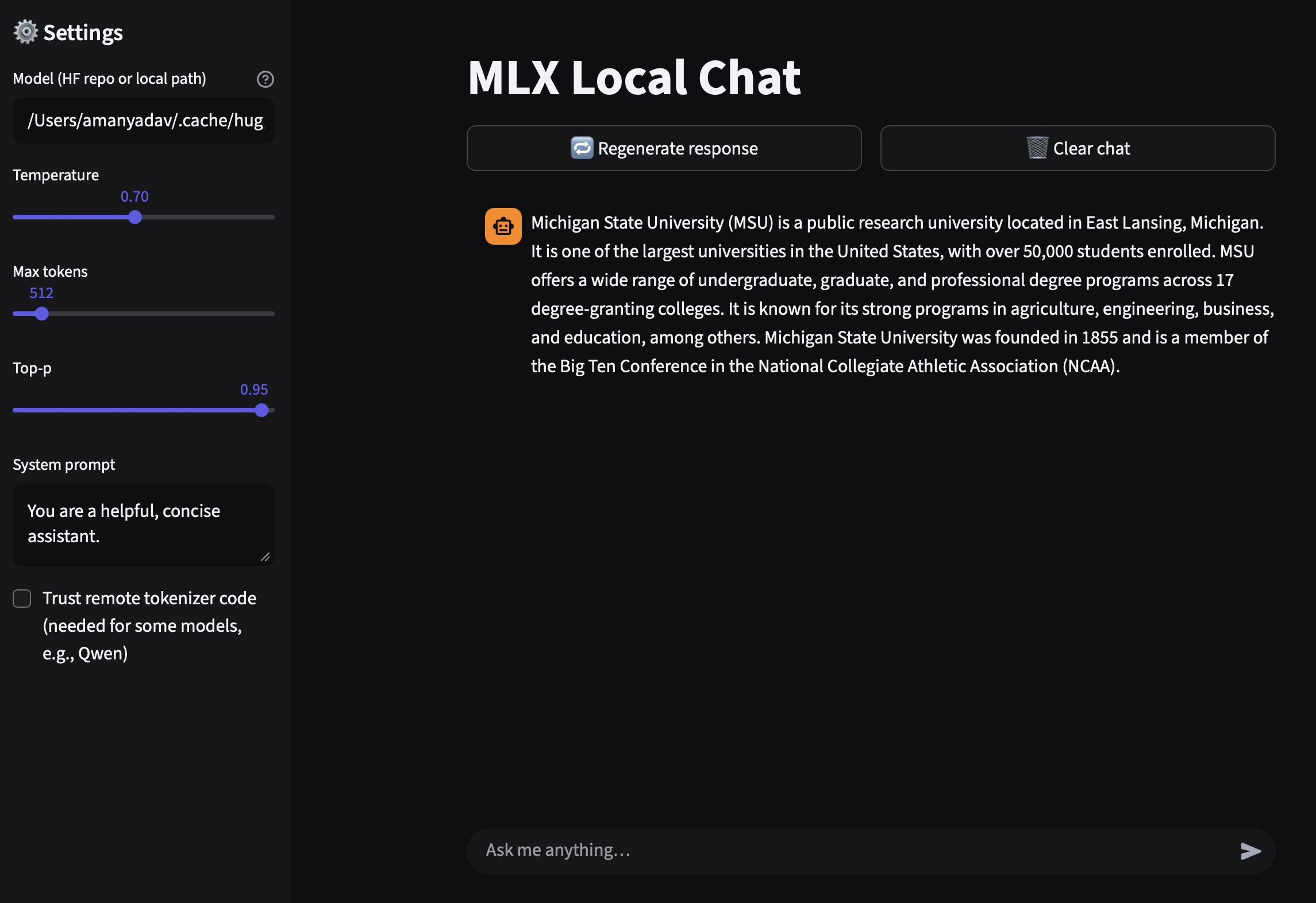
You’ll now see a clean chat interface — type a message and your MLX-powered model will respond right from your Mac!
Step 5: Stop and Deactivate
When you’re done chatting:
- Stop the Streamlit app in Terminal with
Ctrl + C - Deactivate the virtual environment:
deactivate🧾 Summary
| Step | Task | Command |
|---|---|---|
| 1 | Activate environment | source .venv/bin/activate |
| 2 | Install dependencies | pip install streamlit mlx torch torchvision sentencepiece |
| 3 | Create the Streamlit app | streamlit_app.py |
| 4 | Run the app | streamlit run streamlit_app.py |
| 5 | Open browser | http://localhost:8501 |